HDMI Extension Cable or Right-Angle Adapter?
Choose an extension cable for added reach only when its connector details and specifications match your setup. Choose a 90-degree male-to-female adapter when plug direction is the problem. Before buying, measure the full route, confirm connector gender, check clearance and display-mode requirements, and test the assembled connection.
Published Updated

Work out what is stopping the connection
First identify the physical problem. A flat extension adds reach; a 90-degree adapter changes the direction of the plug. Choose according to the space and cable route in front of you.
Look at the TV or receiver while the device is in position. Note which ports are occupied, where the device could rest, and which way a plug would need to turn. If the connection already sits securely and the device has a suitable resting place, you may not need an accessory at all.
Measure the route and verify the signal needs
Measure from the port to the device’s intended resting place along a route the cable can actually follow. Include any existing lead, the length taken up by connector bodies, and space for bends. Choose enough reach to avoid pulling on the plug. A cable that is longer than necessary can be awkward to route, while a short one may leave the device under tension.
Check connector type and gender at every join. An extension or adapter must mate with both the existing lead and the intended port. For an angled adapter, compare the bend direction with the open space around the socket; the turn needs somewhere clear to go.
Your required resolution and refresh rate matter too. Check those against the specifications for the source device, display, and every cable or adapter in the chain. Total path length and supported features are practical compatibility checks. A broad HDMI label by itself does not establish that a particular setup will support the display mode you want.[1][2]
Check the whole physical arrangement
Do not judge the required length from the gap beside the port alone. The device may need to sit farther away, and the available route may curve around furniture or other cables. Account for the existing lead and connector bodies, then check that the assembled connection will not be pulled or forced into an awkward position.
Check the adapter's orientation before buying. The turn needs to face clear space rather than a neighboring plug or surface, and each part's fit in isolation does not tell you how the assembled setup will sit.
Before routing the connection out of reach, test the assembled setup in the display mode you plan to use.
Choose by reach, direction, or no change
Choose an extension when the device needs more reach and you have a practical route for the additional cable. Choose a right-angle adapter when the plug's direction is the main obstacle and its turn will face open space.
Before ordering, compare the measured route or bend direction with your actual layout. If the seller's details do not specify the connector type or display-mode support you need, ask the seller or choose a better-documented item.
If the current setup already fits securely and has enough room, leave it as it is.[1][2]
Two examples for different fit problems
The merchant listing describes a flat-wire HDMI-compatible cable in 1 m, 1.5 m, 2 m, and 3 m lengths. Check the seller's current product details for connector type and display-mode support before deciding whether it suits your setup.
For directional clearance, the merchant listing describes a male-to-female HDMI adapter with a 90-degree bend. It may suit a port layout where that turn faces clear space. Check that both ends match your connection, compare the bend direction with the actual port, and confirm display-mode support in the seller's current details.[1][2]Shop now: HDMI-Compatible Cable Audio Cables Flat Wire Ultra High-speeShop now: HDMI Adapter Cable Male to Female Right Angle 90 Degree Bend
What these listings leave unconfirmed
The merchant titles list four length choices for the flat cable and describe the adapter as male-to-female with a 90-degree bend. They do not establish the flat cable’s physical dimensions or either product’s display-mode support. The guidance excerpts do not verify either product’s performance in a particular setup.[1][2]
AliExpress
Related products
HDMI-Compatible Cable Audio Cables Flat Wire Ultra High-spee
The listing describes a flat-wire HDMI-compatible cable in four lengths: 1 m, 1.5 m, 2 m, and 3 m. Check the connector details before deciding whether it suits your setup.
The title does not establish that the cable is an extension or specify connector details or display-mode support. Check the seller's current product information for the requirements of your setup.
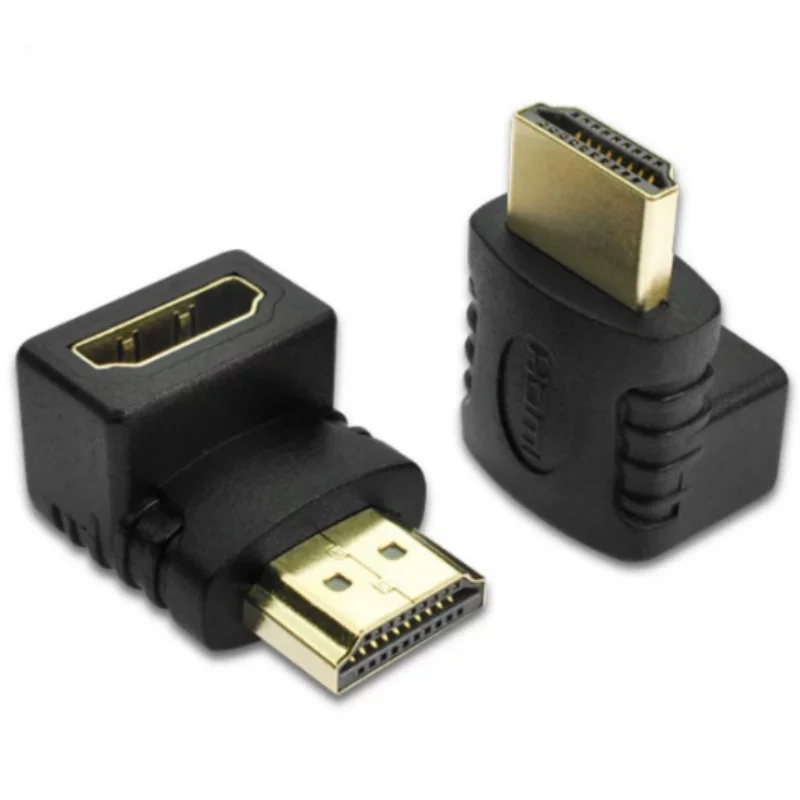
HDMI Adapter Cable Male to Female Right Angle 90 Degree Bend
The listed male-to-female adapter has a 90-degree bend, which may suit a crowded port when the turn can face away from nearby equipment.
The title does not specify display-mode support. Check the seller's current details for the requirements of your setup.
Questions, answered
How much extension length should I buy?
Measure from the port to the place where the device needs to sit, following the route you can use. Include the existing lead and connector bodies, then choose a length that reaches without pulling on the plug. There is no universal minimum; it depends on your layout.[1][2]
Will a right-angle adapter fit any HDMI port?
No. The listing does not establish that the adapter fits every HDMI port. It describes a male-to-female adapter with a 90-degree bend; compare its bend direction with the space around your port and check that the connectors match your setup.